

Load balancers have become an essential part of modern infrastructure. The growth of distributed systems, exponential data growth, dynamic microservice architectures, and edge computing all demand that online services remain performant, available, and reliable at scale. In this article, I go over the main types of load balancers, their algorithms, and the key concepts needed to understand how they work, without going into excessive depth.
Load Balancers vs. Reverse Proxies
Both components sit between clients and servers in a client-server architecture: they accept requests from clients and deliver responses from servers. However, they have subtle differences and distinct use cases. Let’s take a look.
Load Balancers
A load balancer focuses on routing incoming client traffic to the appropriate backend pool (two or more backend servers supporting the same service) and distributing traffic across the servers in that pool.
Common load-balancing functions include:
- Traffic routing: Forwarding client requests to the appropriate backend pool based on specific rules.
- Load balancing: Distributing client requests to the best backend server in the pool based on specific algorithms.
- Service discovery: Automatically detecting and identifying available backend servers on a network.
- Session persistence: Maintaining the state of a user’s session across multiple requests by ensuring that all requests from the same user are sent to the same server (also known as session stickiness or affinity).
- Health checking: Polling backend servers at a defined interval (also known as an active health check).
- Circuit breaker: Monitoring live traffic for errors and determining the health of targets (also known as a passive health check).
It is important to distinguish between routing and balancing rather than using the terms interchangeably. Load balancing involves routing requests, but the reverse is not necessarily true. Routing decides where to forward a request, while load balancing distributes requests across a set of resources designed to process them.
The benefits resulting from these functionalities include:
- Performance: Distributing traffic between backend servers improves response times.
- Availability: Detecting failed backend servers and redirecting traffic away from them.
- Scalability: Allowing for seamless horizontal scaling (scaling-out) of backend servers.
- Security: Hiding backend servers reduces the attack surface and limits external threats.
Reverse Proxies
In contrast, a reverse proxy focuses solely on routing incoming client traffic to the appropriate backend server, even when only one server supports a single service (typically a web server).
Please note that the core function of a reverse proxy is to accept requests and forward them to servers; no additional logic or functionality is strictly necessary. However, reverse proxies typically embed a wide range of capabilities, of which load balancing is just one.
As a result, reverse proxies can provide load-balancing capabilities as well as the following:
- Request/response transformation: Rewriting URLs to meet backend-server requirements; adding or removing headers; and modifying cookies or even response bodies.
- Caching: Storing static and dynamic content to improve response times for subsequent requests.
- Compression: Encoding, restructuring, or otherwise modifying data to reduce its size and improve delivery speed.
- SSL/TLS termination: Providing a single point of configuration and management while offloading traffic encryption and decryption from web servers.
- Web application firewall (WAF): Inspecting and filtering incoming requests to protect backend servers from direct exposure to the Internet.
- Centralized logging: Intercepting client requests directed to your backend servers and logging them before forwarding.
These capabilities provide benefits beyond those of a load balancer:
- Flexibility: Hosting several domains and subdomains behind the same IP address and identifying which backend system should handle each request.
- Maintainability: Abstracting clients from backend servers makes maintenance and upgrades easier, such as deactivating a server or replacing software or hardware.
- Performance: Caching, compression, and SSL/TLS offloading improve web performance by reducing the time needed to generate a response and return it to the client.
- Security: Inspecting and filtering client traffic protects the backend servers from DDoS attacks, SQL injection, cross-site scripting and other malicious behaviors.
- Observability: Because all client requests pass through the reverse proxy, it provides an excellent point for logging and auditing.
Are load balancers and reverse proxies therefore the same? The short answer is no. While load balancers are a particular type of reverse proxy, not all reverse proxies necessarily function as load balancers. However, because load balancers primarily act as reverse proxies, the terms load balancer and reverse proxy are often treated as equivalent. Some popular open-source proxy solutions with load-balancing capabilities include Apache (mod_proxy_balancer), Nginx, HAProxy, and Envoy.
Layer 4 vs. Layer 7 Load Balancers
To understand these distinctions, it is important to keep the OSI model in mind. Use it with caution, as it is a theoretical framework intended to provide guidance rather than a one-size-fits-all explanation. However, an extremely simplified version will do for our purposes:
| Layer | Function | PDU | Example | |
|---|---|---|---|---|
| 7 | Application | Human-computer interaction | Message | HTTP |
| 6 | Presentation | Syntax, compression and encryption | Message | SSL/TLS |
| 5 | Session | Logical communication control | Message | RPC |
| 4 | Transport | Process-to-process communication (port numbers - 0 to 65535) | Segment Datagram | TCP UDP |
| 3 | Network | Host-to-host wide delivery (logical addresses - IPs) | Packet | IP |
| 2 | Data link | Node-to-node local delivery (physical addresses - MACs) | Frame | ARP |
| 1 | Physical | Bit-by-bit medium delivery (wire, fiber, wireless) | Bit | Ethernet IEEE 802.3 WiFi IEEE 802.11 |
A load balancer operating at a given layer can generally provide the capabilities of that layer and those below it. For example, a layer 7 load balancer can also perform layer 4 functions.
Although layer 2 load balancers technically exist, they are used in very specialized scenarios. Therefore, we will focus on layer 4 and layer 7 load balancers, specifically those related to TCP and HTTP protocols (since HTTP uses TCP as its transport protocol).
Layer 4
Layer 4 load balancers operate at the transport layer. They make routing decisions based on the IP address (layer 3) and port number (layer 4) in the packet header. Because they do not inspect application data, they are fast and well suited to TCP and UDP traffic.
Advantages:
- Fast performance: There is no application-data lookup; the load balancer simply forwards opaque network packets to and from servers based on ports and IP addresses.
- Small attack surface: Since there is no data lookup, the content of the packets can’t be compromised.
- Maximized TCP connections: The number of concurrent TCP connections is maximized by maintaining only one NATed connection between the client and the backend server (max concurrent connections = number of backend servers * max connections per backend server).
- Application-protocol agnostic: Operating at the transport layer handles the movement of data between devices without knowledge of the content of messages from upper layers.
Disadvantages:
- Simple load balancing: They cannot distinguish between different types of content or apply routing rules based on application data.
- Sticky connections: All packets in a connection are routed to a single backend server. A new server is selected for the next connection based on the algorithm, which can be problematic with multiplexing and keep-alive protocols.
- Limited persistence options: The source IP address is the only persistence option when shared data or session state is stored locally on the backend server.
- Uncached content: Because they do not examine the content of the packets being transmitted, they cannot perform caching.
- Not microservice-oriented: Stickiness and simple load balancing make them less effective for REST API-based communication between microservices.
Multiplexing and keep-alive techniques are crucial for optimizing network communications, but they are different concepts. While multiplexing allows multiple service requests to share a single connection, keep-alive ensures that the connection between devices remains open even when no data is being transmitted, reducing the overhead of establishing new connections.
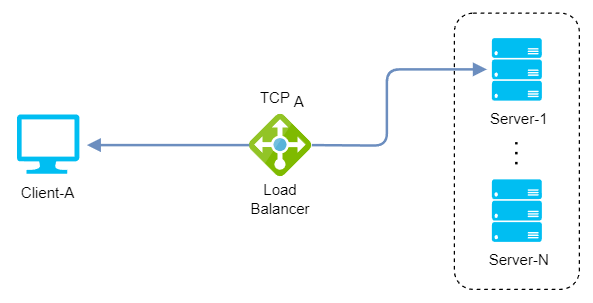
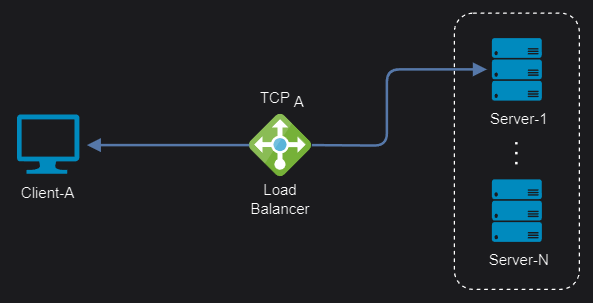 Layer 4 TCP connections
There are also layer 4 reverse-proxy load balancers that can terminate connections at the load-balancing layer and then distribute TCP traffic to backends, with or without SSL. However, for HTTP/S traffic, using a layer 7 load balancer is recommended instead.
Layer 7
Layer 7 load balancers operate at the application layer and make routing decisions based primarily on application-level messages, such as HTTP headers, cookies, and URLs. This enables more content-based routing and more advanced load-balancing algorithms.
Remember that we are focusing on HTTP, but decisions can be based on data from any other application protocol supported by the load balancer, such as MongoDB, MySQL, or Redis (with experimental support in Istio).
Advantages:
- Smart load balancing: Reading messages in network traffic and making routing decisions based on their content, while also allowing optimizations and transformations.
- Cached content: Inspecting transmitted content makes it possible to cache frequently accessed resources, such as images and static files, reducing the load on backend servers.
- Balanced connections: Creating connections to multiple servers for a single client connection rather than selecting a single server, which works well with multiplexing and keep-alive protocols.
- Multiple persistence options: The source IP address, HTTP cookie, and SSL session ID are just a few persistence options when shared data or session state is stored locally on the backend server.
- Microservice-oriented: Balanced connections and intelligent load balancing make them better suited to inter-process communication between microservices based on REST APIs.
Disadvantages:
- Higher resource consumption: Inspecting packet content and handling SSL/TLS encryption and decryption are CPU-intensive tasks that require more computing power.
- Larger attack surface: Storing SSL certificates on the load balancer and examining packet content can make application security issues exploitable.
- Limited TCP connections: The number of concurrent TCP connections is limited because traffic is terminated and TCP connections are then created or reused for the selected server (max concurrent connections = max load balancer connections - number of backend servers).
- Application-protocol dependent: The load balancer must understand the application protocol because it operates at the application layer and handles the content of each message.
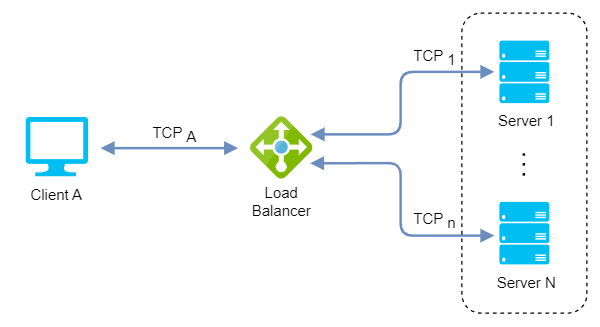
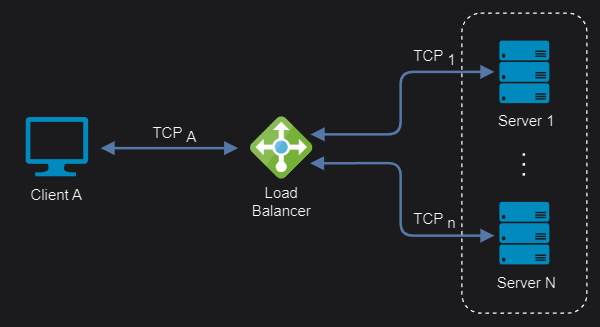 Layer 7 TCP connections
Load Balancer topologies
Client-side and server-side load balancing are two ways to distribute work among multiple servers. The main difference is where the load-balancing logic resides and who decides which server receives a request.
Server-side
In server-side load balancing, instances of a service are deployed on multiple servers and a load balancer sits in front of them. All incoming requests reach the load balancer, which acts as an intermediary and selects a server for each request according to an algorithm. Depending on how it connects to the network and the servers, we have:
One-Arm
In a one-arm configuration, the load balancer is not directly in the traffic path between the client and the server. Instead, it acts as a proxy that performs source NAT/SNAT to route traffic between them.
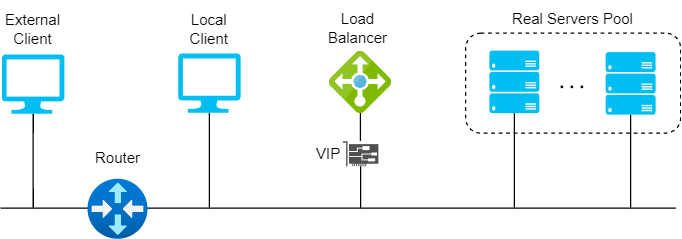
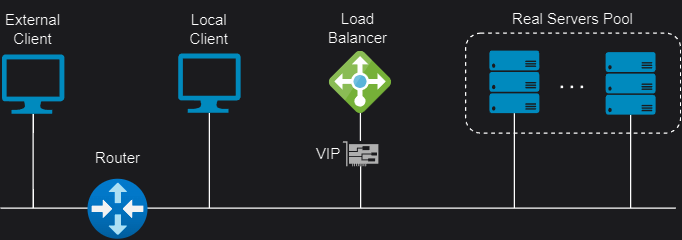 Server-side one-arm topology
Two-Arm
In a two-arm configuration, the load balancer has two network interfaces connected to two different subnets. In this mode, the load balancer acts as a bridge between the client and the server, and the virtual services and the servers are on different subnets.
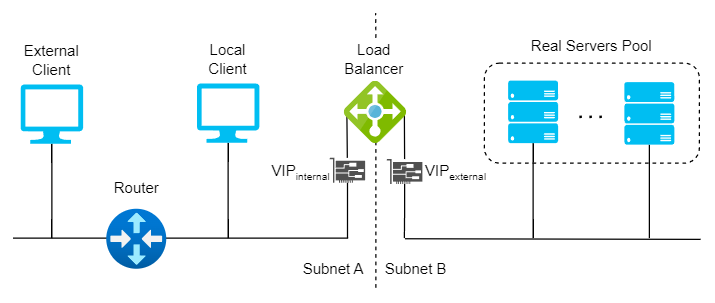
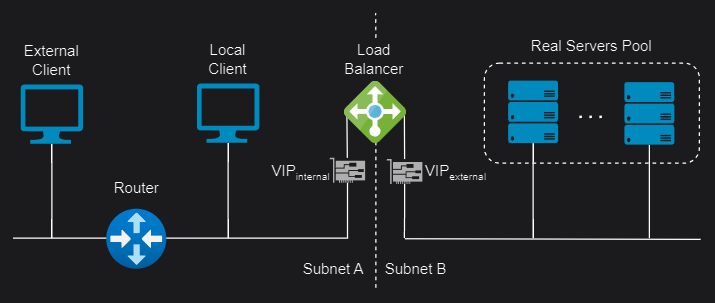 Server-side two-arm topology
Client-side
In client-side load balancing, instances of a microservice are deployed on several servers. The load-balancing logic runs in the client itself: it maintains a list of servers and selects a server for each request according to an algorithm. There are two approaches:
Sidecars
Sidecar load balancers run as separate processes or containers alongside client applications. They distribute traffic between multiple servers without adding an extra network hop or a centralized bottleneck. They also provide features such as health checks, retries, circuit breaking, and metrics. Popular examples include:
Envoy (Istio): Istio uses an extended version of the Envoy proxy, a high-performance proxy developed in C++, to mediate all inbound and outbound traffic for services in the service mesh. Deployed as sidecars, Envoy proxies are the only Istio components that interact with data-plane traffic, enhancing services with Envoy’s built-in features.
Linkerd2-proxy (Linkerd): The Linkerd data plane comprises ultralight micro-proxies written in Rust and deployed as sidecar containers inside application pods. These proxies transparently intercept TCP connections to and from each pod. Unlike Envoy, Linkerd2-proxy is designed specifically for service-mesh use cases rather than as a general-purpose proxy.
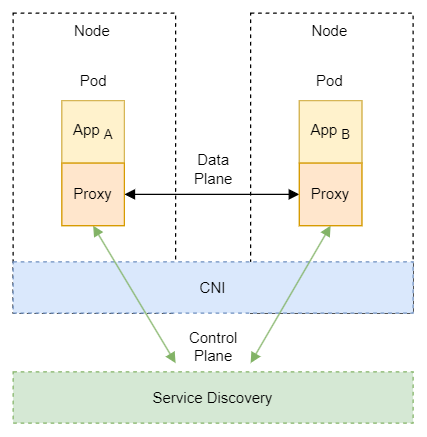
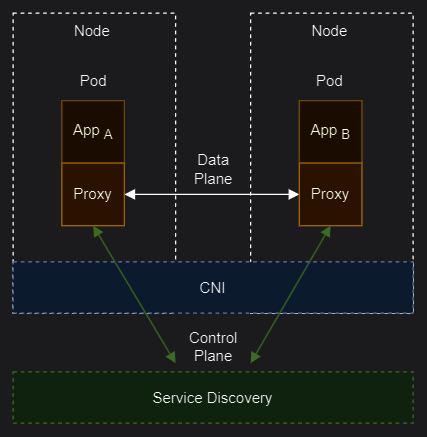 Client-side sidecar topology
Libraries
A library-based client-side load balancer is a software component that runs within the client application and distributes requests across multiple servers without a centralized component. It requires a service-discovery mechanism to obtain the list of available servers and a load-balancing algorithm to select the best server for each request. Popular examples include:
Ribbon (Netflix OSS): A cloud library that provides client-side load balancing for distributed applications. It is part of Netflix Open Source Software (Netflix OSS) and integrates with other Netflix components, such as Eureka and Hystrix. Ribbon allows users to implement their own load-balancing policies or use predefined ones, such as round robin, availability filtering, weighted round robin, ring hash, and least request.
Spring Cloud Loadbalancer (Spring Cloud): A load-balancer library that provides client-side load balancing for Spring Cloud applications. It supports reactive and blocking modes, service-discovery integration, health checking, caching, and metrics. Spring Cloud Loadbalancer can use different algorithms, such as round robin, random, and best available.
gRPC Load Balancer (Google): gRPC is an RPC framework implemented on top of HTTP/2. Client-side load balancing allows gRPC clients to distribute load optimally across available servers. The client receives load reports from backend servers and implements the load-balancing algorithms.
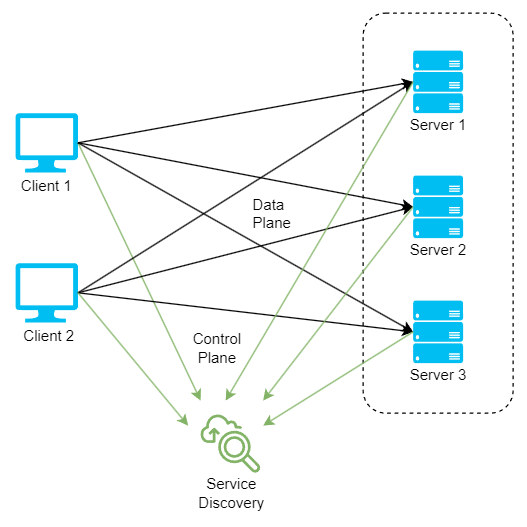
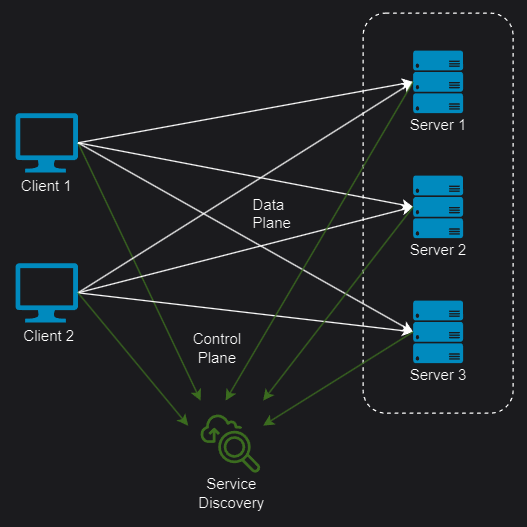 Client-side library topology
Load balancing modes
Load-balancing modes differ in how the load balancer handles the source and destination IP addresses of packets forwarded between clients and servers. The most appropriate mode depends on the specific scenario and topology. Multiple modes can also be used together.
Layer 4 Direct Routing (DR)
Also known as Direct Server Return or nPath, this mode allows backend servers to return responses directly to clients without passing through the load balancer. It requires few changes to an existing infrastructure and offers high performance and scalability by reducing the bandwidth and processing load on the load balancer. However, it requires some server configuration changes and layer 2 connectivity, so the load balancer must be in the same subnet as the servers.
DR mode works by changing the destination MAC address of an incoming packet to match the selected server on the fly (ARP spoofing). When the packet reaches the server, that server must own the Virtual Service IP address (VIP). This means that you need to ensure that:
- The servers (and the load balanced application) respond to both the servers’ own IP address and the VIP.
- The servers don’t respond to ARP requests for the VIP (only the load balancer should do this).
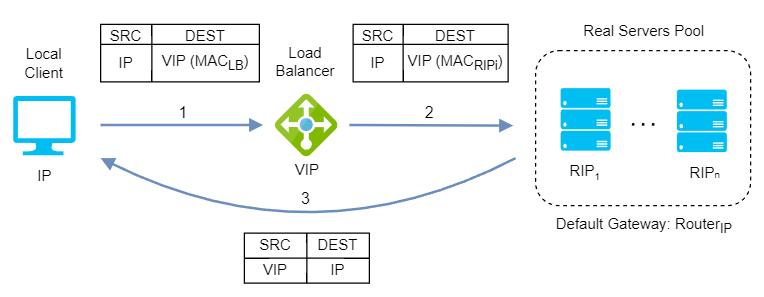
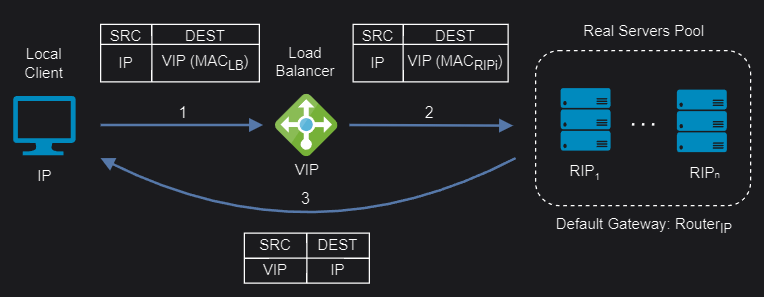 Layer 4 Direct Routing mode
DR mode doesn’t support port translation (for example, VIP:80 to RIP:8080), and it is transparent: the server sees the client’s source IP address.
Layer 4 Tunneling (TUN)
Like layer 4 DR, TUN uses direct server return, but it forwards requests from the load balancer to servers through IP tunneling. This allows servers in different data centers to be used and sends responses directly to clients, bypassing the load balancer.
TUN mode can work on any network, provided that the load balancer and servers support IP tunneling. This technique encapsulates an IP packet inside another IP packet, creating a tunnel between two endpoints. The load balancer uses it to send the original client request to the server without modifying either IP address. The server extracts and processes the original request, then sends the response to the client using the original source IP address as the destination.
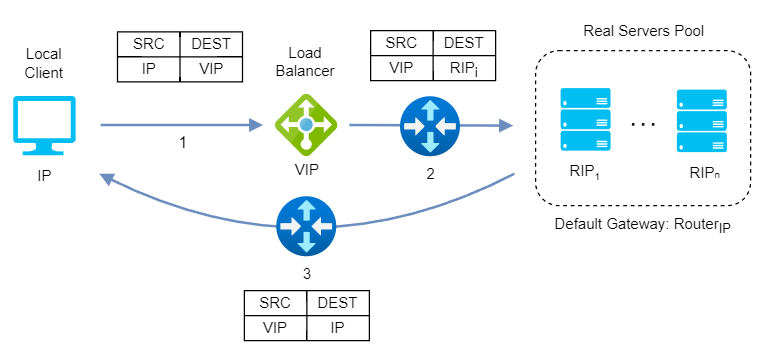
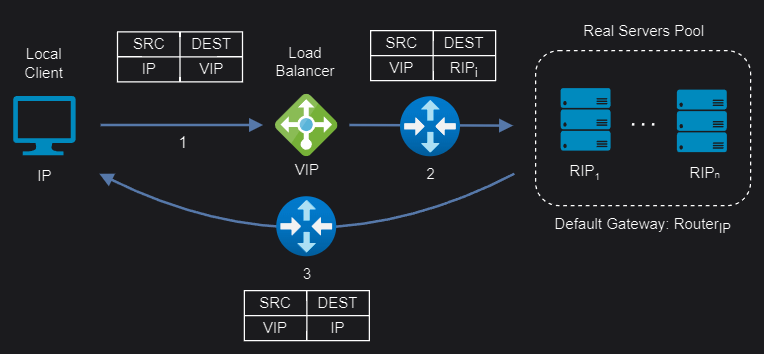 Layer 4 Tunnel mode
TUN mode doesn’t support port translation and depends on how the load balancer and the servers are configured for transparency.
Layer 4 Network Address Translation (NAT)
Layer 4 NAT mode is also a high-performance solution, although it is not as fast as layer 4 DR because server responses must return to the client through the load balancer rather than directly. The load balancer translates all requests from the Virtual Service to the servers. NAT mode can be deployed in the following ways:
One-Arm: The VIP is configured in the same subnet as the servers. To support remote clients, the servers’ default gateway must be an IP address on the load balancer, and the load balancer must route return traffic back through the router. For local clients, return traffic would normally bypass the load balancer and go directly to the client, which would break NAT mode. To prevent this, modify the servers’ routing tables to force return traffic through the load balancer.
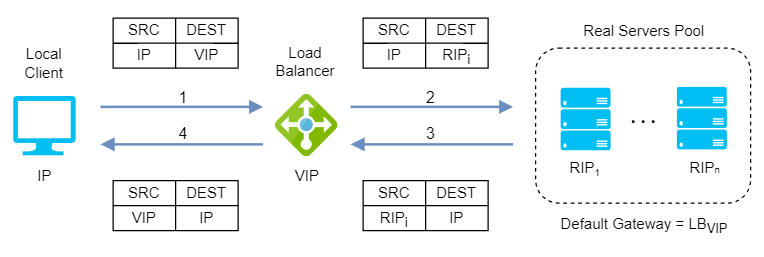
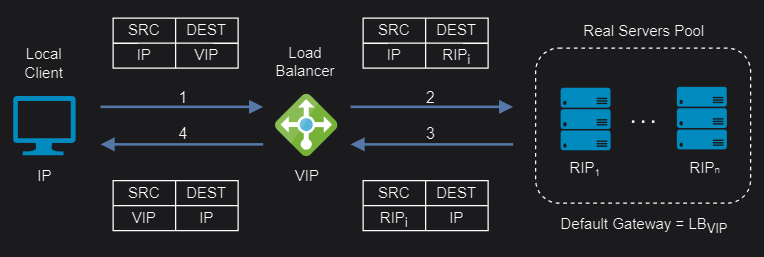 Layer 4 NAT one-arm mode
Two-Arm: The VIP is located in one subnet and the servers in another. This can be achieved by using two network adapters or by creating VLANs on a single adapter. The servers’ default gateway must be an IP address on the load balancer. Clients can be in the same subnet as the VIP or in any remote subnet that can route to it.
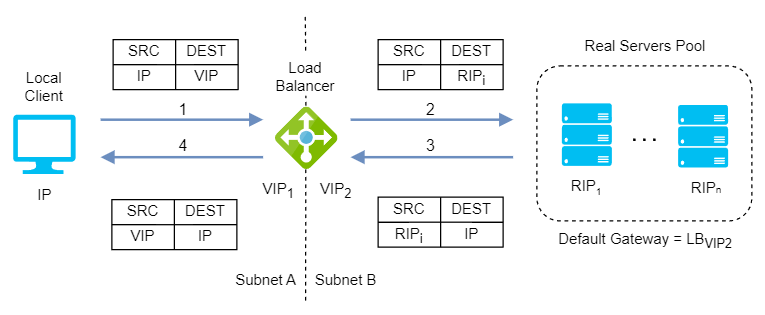
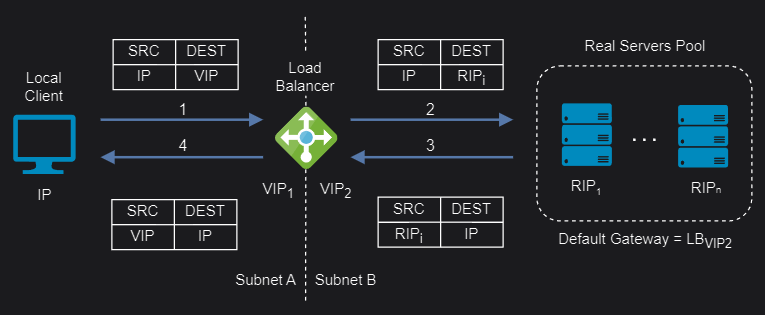 Layer 4 NAT two-arm mode
If you want servers to be accessible through their own IP addresses for non-load-balanced services, such as SSH, you will need to set up individual SNAT and DNAT firewall script rules for each server or add additional VIPs.
NAT mode supports port translation and is also transparent.
Layer 4/7 Source Network Address Translation (SNAT)
Layer 4 SNAT mode is also a high-performance solution, although it is not as fast as layer 4 NAT or layer 4 DR. The load balancer translates requests in the same way as NAT mode, but an iptables SNAT rule replaces the original client IP address with that of the load balancer.
In layer 7 SNAT mode, the load balancer acts as a full application-layer proxy, so any server in the cluster can be in any accessible subnet, including across the Internet or a WAN. Inbound requests terminate at the load balancer, and the proxy generates a corresponding request to the selected server. This makes it slower than the layer 4 modes.
Layer 4/7 SNAT mode requires no mode-specific configuration changes to the servers and it can be deployed using either a one-arm or two-arm configuration:
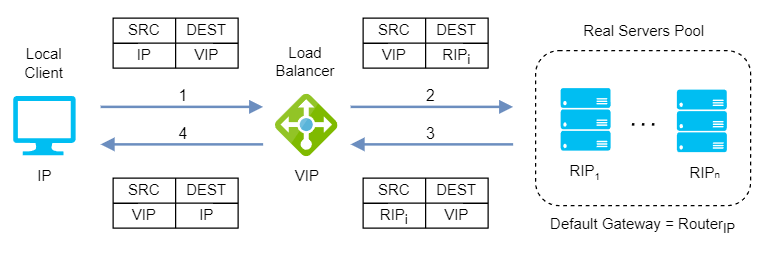
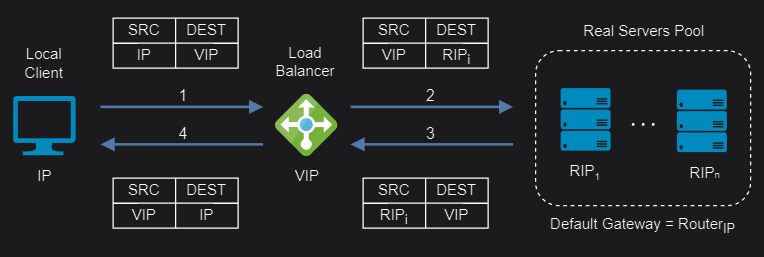 Layer 4/7 SNAT one-arm mode
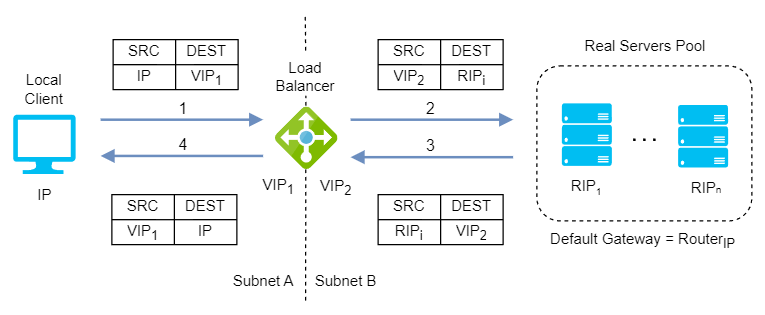
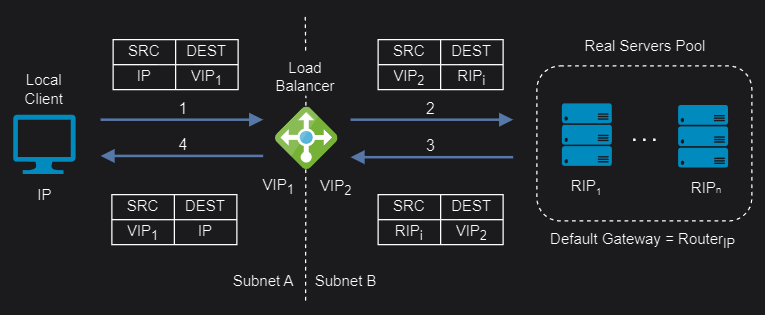 Layer 4/7 SNAT two-arm mode
You should not use the same RIP:PORT combination for layer 4/7 SNAT mode VIPs because the required firewall rules conflict.
Layer 4/7 SNAT mode supports port translation and it is not transparent.
If transparency is required, layer 7 SNAT mode can be configured to provide the client’s IP address to the servers in two ways:
- By inserting a header that contains the client’s source IP address.
- By modifying the source address field of the IP packets and replacing the IP address of the load balancer with the IP address of the client.
Load balancing algorithms
Finally, let’s look at load-balancing algorithms: sets of rules that a load balancer follows to select the best server in a pool for each client request while keeping distribution even and efficient. They fall into two main categories:
Static load balancing algorithms
Static load balancing follows fixed rules and is independent of the current server state. It sends an equal amount of traffic to each server in a pool, either in a specified order or at random. Static load-balancing algorithms are recommended when:
- You have a low or stable fluctuation in incoming traffic and do not need to adjust to changing network conditions.
- You want to simplify the configuration and maintenance of your servers and load balancer.
- You have servers with similar capacities and resources and want to distribute traffic evenly among them.
- You are concerned about the resource consumption and latency of your load balancer and servers.
Let’s look at some examples of static load-balancing algorithms:
Round-robin: A simple way to distribute client requests among a group of servers. Each request is sent to the next server in turn, and the load balancer returns to the top of the list after reaching the last server. It is easy to implement and is the most widely deployed load-balancing algorithm. It works best when servers have roughly identical computing capacities.
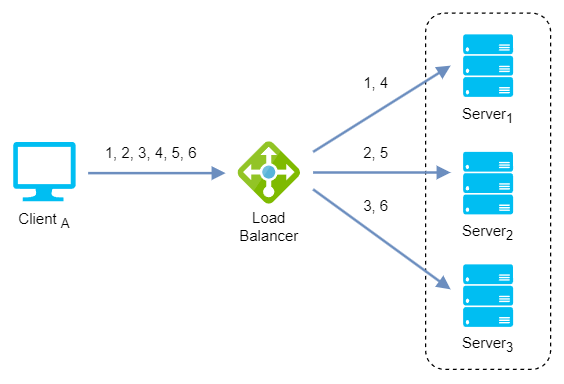
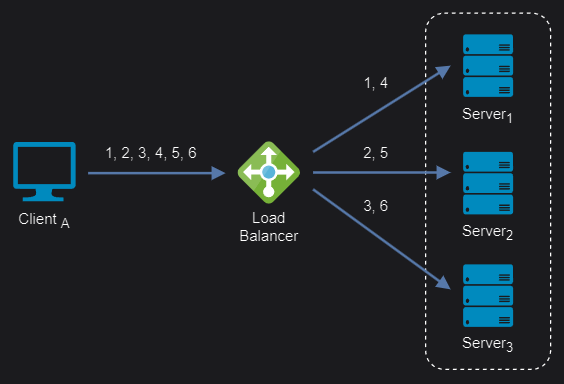 Round-robin algorithm
Weighted round-robin: An improvement on round-robin that accounts for uneven server capacity. It distributes client requests according to individual server weights: a server with a higher weight receives more requests than one with a lower weight. The algorithm cycles through the servers and assigns a fixed number of requests to each according to its weight.
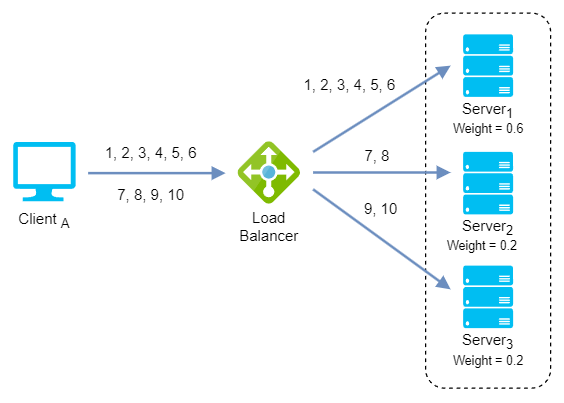
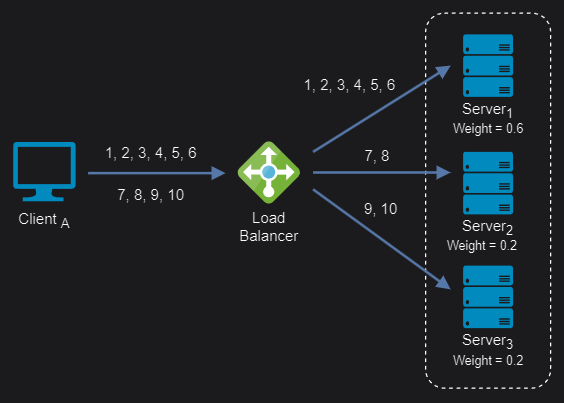 Weighted round-robin algorithm
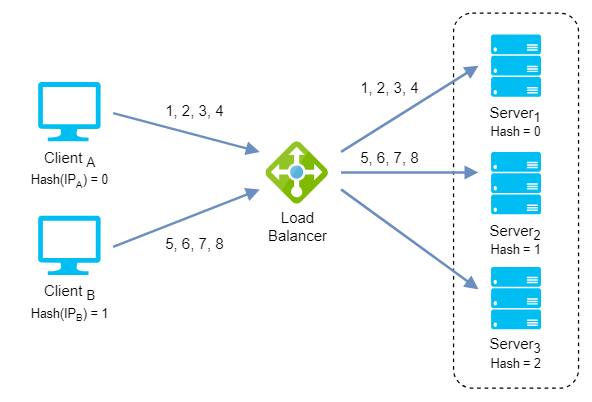
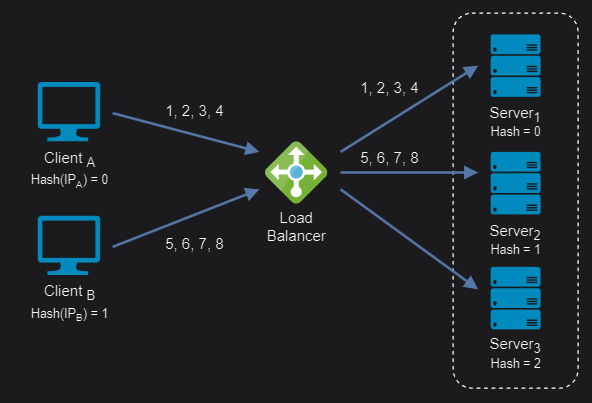
IP Hash: This algorithm is based on the source and destination IP addresses of each packet. It calculates a hash value to determine which server receives the packet. As a result, packets with the same source and destination IP addresses are always sent to the same server, ensuring session persistence.
 IP Hash algorithm
Dynamic load balancing algorithms
Dynamic load balancing uses algorithms that consider each server’s current availability, workload, and health, then distribute traffic accordingly. Dynamic load-balancing algorithms are recommended when:
- You have a high fluctuation in incoming traffic and need to adapt to changing network conditions.
- You want to avoid overloading or failing any server and ensure optimal performance and availability for your application.
- You have servers with different capacities and resources and want to distribute traffic accordingly.
- You are willing to invest in more complex configuration and monitoring of your servers and load balancer.
Let’s look at some examples of dynamic load-balancing algorithms:
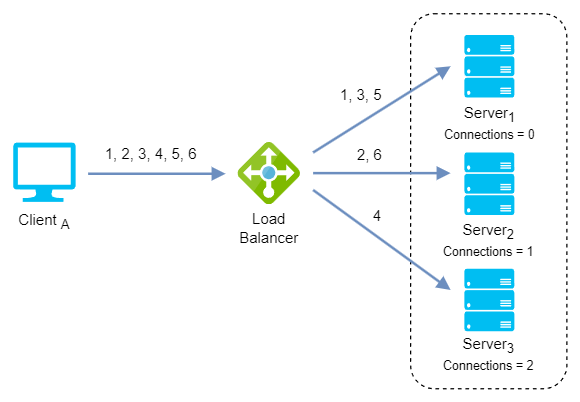
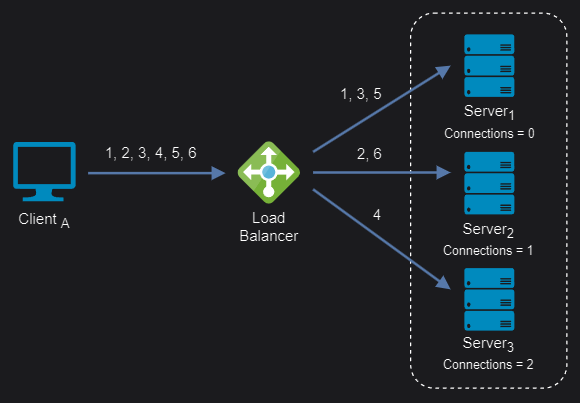
Least connection: This algorithm identifies the servers with the fewest open connections and sends traffic to them. It assumes that all connections require roughly equal processing power.
 Least connection algorithm
Weighted least connection: This algorithm assigns different weights to servers, assuming that some can handle more connections than others. Incoming requests are distributed to the servers with the fewest connections relative to their weight.
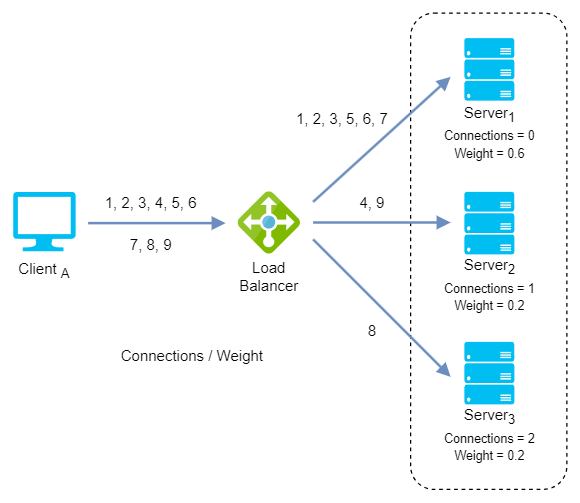
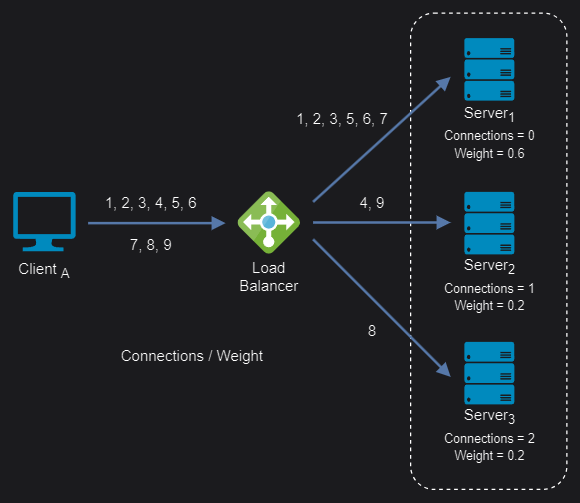 Weighted least connection algorithm
Least response time: This algorithm distributes network traffic based on the number of active connections and the average response time of each server, such as time to first byte (TTFB). It assumes that servers with lower response times are less busy and can handle new requests more quickly.
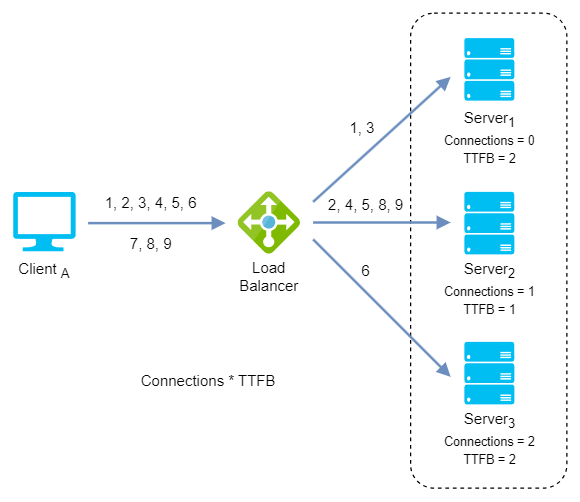
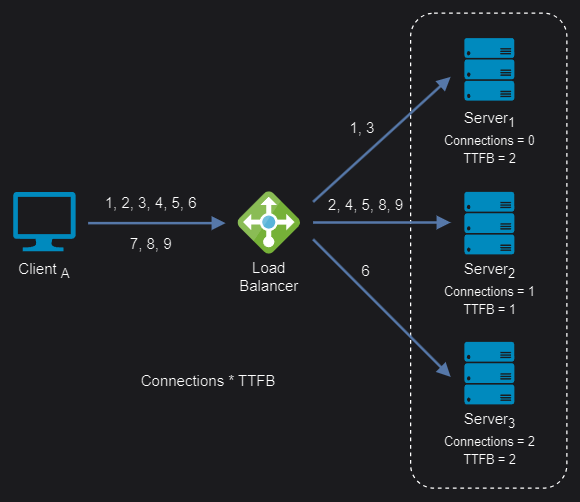 Least response time algorithm
Weighted least response time: This algorithm also assigns different weights to servers. Incoming requests are distributed to the server with the lowest ratio of active connections and response time relative to its weight.
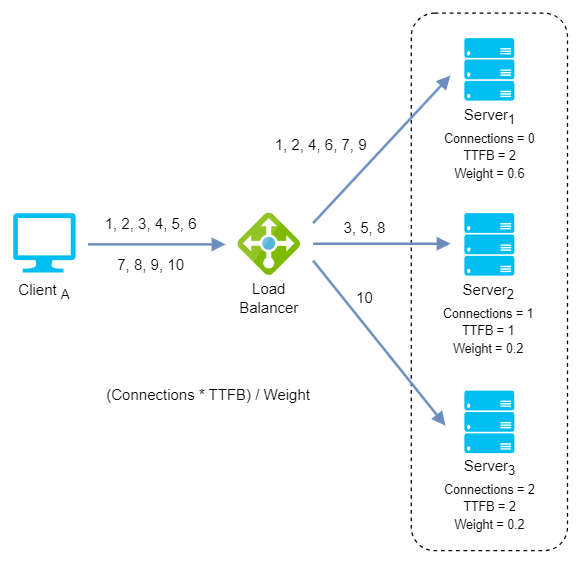
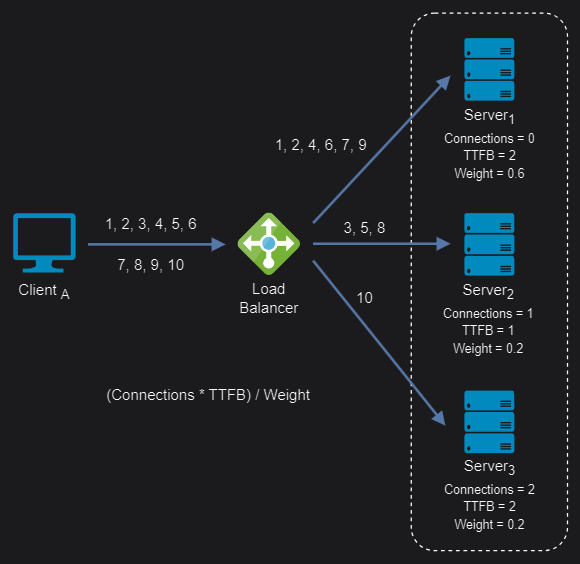 Weighted least response time algorithm
Conclusion
In this article, I’ve gathered the key concepts worth knowing when working with infrastructure built on load balancers and reverse proxies: their differences, layer 4 vs. layer 7 balancing, client-server topologies, load-balancing modes, and the main static and dynamic algorithms.
That said, this is a broad and complex enough field to deserve a study of its own. In upcoming posts, I’ll show how to implement some current solutions for specific scenarios.